How to Connect a SQLite Database to Claude Code with MCP: A Step-by-Step Tutorial
Most of the attention given to Claude Code is around agents and, while they rightfully deserve the crown, the unsung hero of Claude Code is in its ability to connect to MCPs, especially to your custom MCPs. Today I am going to cover creating, and connecting to, a SQLite database MCP in this Claude Code tutorial.
MCP: The Model Context Protocol
At a high level, MCP, or Model Context Protocol, is a system of layers that allows a host (AI interface, agent, etc.) to retrieve context. But this isn't a particularly deep system and can be easily understood. In fact, just understanding three basic objects will help you grasp the concept as a whole.
The MCP Host
Simply put, the MCP Host is the AI mechanism used to connect to an MCP Server, which is a bit of a misnomer that I'll spell out in the next paragraph. Some examples of MCP Hosts are Claude Code and Claude Cowork.
The MCP Client
Remember way back like 10 seconds ago when I said the MCP Host connects to the MCP Server, then I called it a bit of a misnomer? That's because the term MCP Server encompasses both a MCP Client and a MCP Server. Instead of calling it the MCP Client-Server, it has been shortened to MCP Server, and I bet that has saved countless hyphens, only for them to be later used in AI-approved em dashes. Tragic, really.
The MCP Client has two main functions: it maintains a connection to the actual MCP Server and retrieves context from it as well. After all, it is the Model Context Protocol.
The MCP Server
Finally, the MCP Server. The real meat and potatoes of the entire system. The MCP Server is what generates the context. It could be something as simple as a JSON-wrapped "Hello World," although that wouldn't be particularly useful. Instead of just passing back some static string context, I want this tutorial to be a building block for something larger in your personal or professional projects by allowing our MCP Server to connect to, and query from, a database.
The Database Setup
Let's create a simple four-table SQLite database that might mimic a business database structure that contains customers, orders, products, and order detail records. I called mine "business.sqlite". This four-table database contains enough relationships to make it more like a real business environment without being too overwhelming.
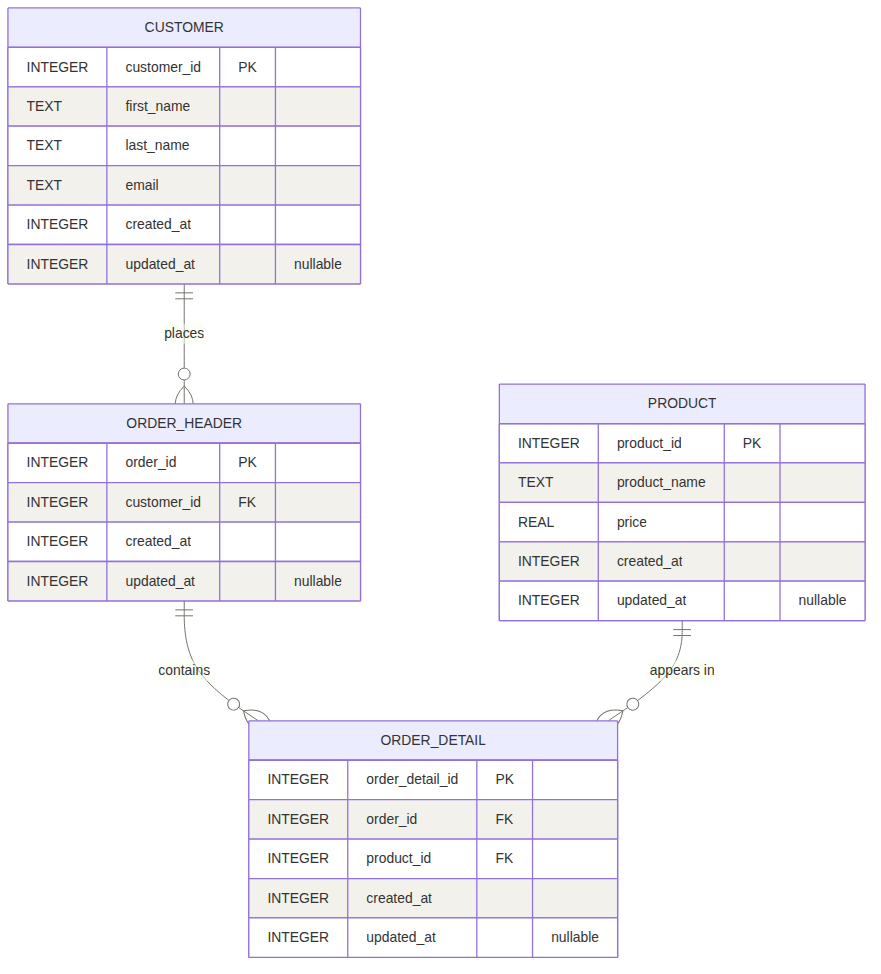
To create this database and tables, I used Jetbrains' DataGrip, which is free for non-commercial use.
And here is the data definition language query I wrote to generate the tables:
CREATE TABLE customer
(
    customer_id INTEGER PRIMARY KEY AUTOINCREMENT NOT NULL,
    first_name TEXT NOT NULL,
    last_name TEXT NOT NULL,
    email TEXT NOT NULL,
    created_at INTEGER NOT NULL,
    updated_at INTEGER NULL
);

CREATE TABLE product
(
    product_id INTEGER PRIMARY KEY AUTOINCREMENT NOT NULL,
    product_name TEXT NOT NULL,
    price REAL NOT NULL,
    created_at INTEGER NOT NULL,
    updated_at INTEGER NULL
);

CREATE TABLE order_header
(
    order_id INTEGER PRIMARY KEY AUTOINCREMENT NOT NULL,
    customer_id INTEGER NOT NULL,
    created_at INTEGER NOT NULL,
    updated_at INTEGER NULL,
    FOREIGN KEY (customer_id) REFERENCES customer(customer_id)
);

CREATE TABLE order_detail
(
    order_detail_id INTEGER PRIMARY KEY AUTOINCREMENT NOT NULL,
    order_id INTEGER NOT NULL,
    product_id INTEGER NOT NULL,
    created_at INTEGER NOT NULL,
    updated_at INTEGER NULL,
    FOREIGN KEY (order_id) REFERENCES order_header(order_id),
    FOREIGN KEY (product_id) REFERENCES product(product_id)
);
Once your tables have been created, run the following data manipulation language (DML) query to populate them:
INSERT INTO product (product_name, price, created_at)
VALUES
(
    'Clean-Ex',
    5.99,
    unixepoch()
),
(
    'Funny Putty',
    7.99,
    unixepoch()
),
(
    'Dusk Dish Detergent',
    6.99,
    unixepoch()
),
(
     'Gummi Chairs',
     3.99,
     unixepoch()
);

INSERT INTO customer (first_name, last_name, email, created_at)
VALUES
(
    'Gerald',
    'Stinefield',
    'gstinefield@isdn.com',
    unixepoch()
),
(
    'Mortimer',
    'Mennon',
    'mmennon@dialup.com',
    unixepoch()
),
(
    'Wayne',
    'Newman',
    'wnewman@isp.com',
    unixepoch()
);

INSERT INTO order_header (customer_id, created_at)
VALUES
(
    (SELECT customer_id FROM customer c WHERE c.email='wnewman@isp.com'),
    unixepoch()
),
(
    (SELECT customer_id FROM customer c WHERE c.email='gstinefield@isdn.com'),
    unixepoch()
);

INSERT INTO order_detail (order_id, product_id, created_at)
VALUES
(
    (SELECT MIN(order_id) FROM order_header o),
    (SELECT product_id FROM product p WHERE p.product_name = 'Funny Putty'),
    unixepoch()
),
(
    (SELECT MIN(order_id) FROM order_header o),
    (SELECT product_id FROM product p WHERE p.product_name = 'Funny Putty'),
    unixepoch()
),
(
    (SELECT MIN(order_id) FROM order_header o),
    (SELECT product_id FROM product p WHERE p.product_name = 'Funny Putty'),
    unixepoch()
),
(
    (SELECT MAX(order_id) FROM order_header o),
    (SELECT product_id FROM product p WHERE p.product_name = 'Dusk Dish Detergent'),
    unixepoch()
),
(
    (SELECT MAX(order_id) FROM order_header o),
    (SELECT product_id FROM product p WHERE p.product_name = 'Gummi Chairs'),
    unixepoch()
),
(
    (SELECT MAX(order_id) FROM order_header o),
    (SELECT product_id FROM product p WHERE p.product_name = 'Clean-Ex'),
    unixepoch()
);
The MCP Setup
Now that the database has been created, let's create a Python script to serve as our MCP Server. This can just live on the same machine you're working on to make the connection simpler.
While we could all use Claude Code to generate the Python script, for consistency's sake, I'm going to code it by hand so we all have the same version to run.
You will need to install one Python package called mcp. You can use this command from your Python virtual environment:
pip install mcp
Here's the Python script that sets up the MCP server as well as the connection to the SQLite database we created earlier. Update the DATABASE_LOCATION constant in the script, providing it the absolute path and filename of your SQLite database.
import sys
import sqlite3
from mcp.server.fastmcp import FastMCP

# Constant containing full path & filename to SQLite database. Modify this for your specific situation.
DATABASE_LOCATION = "ABSOLUTE_PATH_TO_YOUR_SQLITE_DATABASE/YOUR_SQLITE_DB_NAME.sqlite"

# Declare and initialize a new MCP server called "business-mcp"
mcp = FastMCP("business-mcp")

# This is just a sanity check function that, when called, determines whether or not the MCP server is running
@mcp.tool()
def ping() -> str:
    """Health check. This returns a confirmation string when the MCP server is running."""
    return "MCP Server available"

@mcp.tool()
def execute_query(sql: str) -> list[dict]:
    """Run a read-only SELECT query against the business database.

    Supplied str argument is the SQL SELECT statement to execute
    Function returns a list of rows keyed to column name

    """

    # Get a connection to the database
    conn = get_db_connection()

    # Return all rows from the supplied query
    try:
        rows = conn.execute(sql).fetchall()
        return [dict(r) for r in rows]
    except sqlite3.Error as err:
        print(f"Database connection failed: {err}", file=sys.stderr)
        raise
    finally:
        conn.close()

# This function attempts to make a connection to the database in DATABASE_LOCATION
# If found, a connection object is returned.
# If not found or other error, an exception is raised and the error is written to stderr, which is visible in Claude Code
def get_db_connection():
    try:
        # Attempt a connection to the database in read-only mode
        conn = sqlite3.connect(f"file:{DATABASE_LOCATION}?mode=ro", uri=True)

        # Allow access to results via field names instead of by index
        conn.row_factory = sqlite3.Row

        # Return the connection object
        return conn
    except sqlite3.Error as err:
        print(f"Database connection failed: {err}", file=sys.stderr)
        raise

# Call the run() method on the mcp instance object if this is the directly-called script
if __name__ == "__main__":
    mcp.run()
Add the MCP to Claude Code
Once the script above has been saved, execute the following command, performing two actions first:
- Update the name of the /absolute/path/to/your/venv/python to point to the absolute path of the Python executable in your Python virtual environment
- Update the name of the /absolute/path/to/your/python/script/your-python-script.py to point to the absolute path of the Python script you saved
It would look something like this:
claude mcp add business-mcp -- /absolute_path_to_your_venv/python /absolute_path_to_your_python_script/your_python_script.py
If successful, this should elicit a response from Claude Code that looks like this:
Added stdio MCP server business-mcp with command: /home/mp/Development/blog_post_projects/mcp_server/bin/python3 /home/mp/Development/blog_post_projects/mcp_server/main.py to local config
Note: If you get an error, ensure you've provided the correct absolute paths and filenames.
It's Showtime
Now open Claude code:
claude
Let's see if the MCP server is up. Use the following prompt to have Claude Code perform that test:
Using business-mcp, ping the server
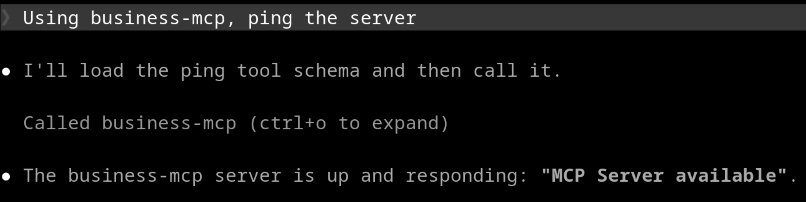
If the MCP server is available, you should see the message, "MCP Server available".
Now let's use Claude Code to query the SQLite database using plain language. Run this prompt to show all orders from Gerald Stinefield:
❯ Using business-mcp, show me all orders for Gerald Stinefield.
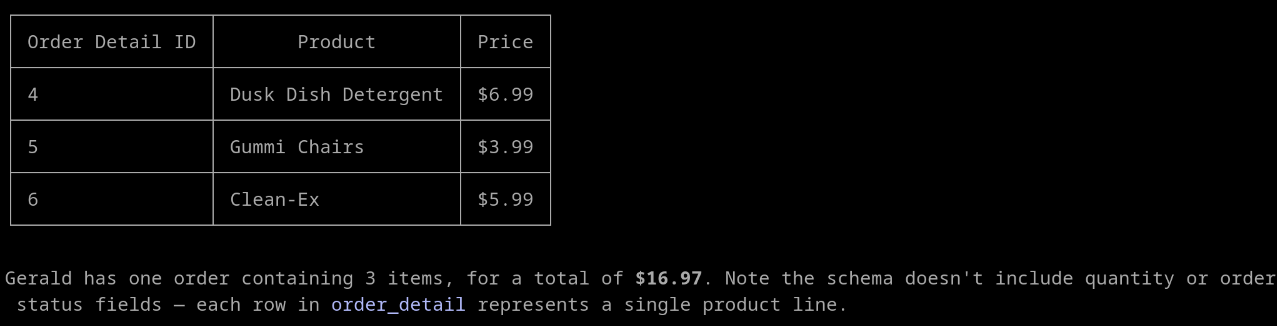
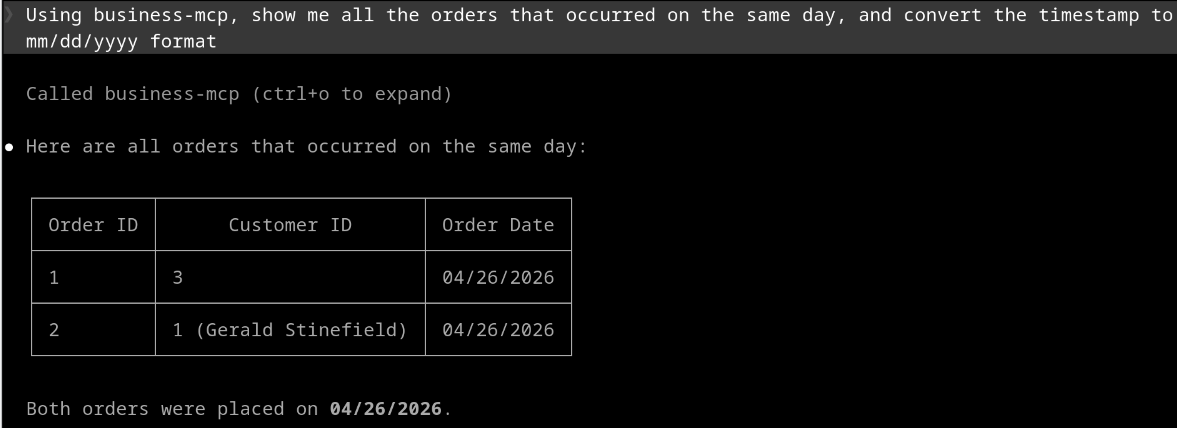
Let's see if we can find all orders placed on the same day. Run this prompt:
❯ Using business-mcp, show me all the orders that occurred on the same day.
What other plain-language queries can you run against the database? Can you add more data to the database to make those queries more comprehensive?
Production Considerations
This tutorial used SQLite because it's quick, easy, and easily accessible, but a more robust database should be used in production if you have more than a handful of users.
The connection created in the Python script was created read-only, which prevented Claude Code from updating any data. Using the correct permissions is critical to maintaining your data. You don't want to let Claude Code, or any AI tool, have rights to do anything in your database. Always provide the least amount of rights necessary to do the job.
There may be situations when you wouldn't want your AI to read from specific columns in your database tables, due to privacy concerns, PII, private information, etc. One of the easiest ways to limit Claude's field selection is to only expose views instead of tables. Views allow you to control which fields are available for querying. In databases like MySQL, SQL Server, and PostgreSQL, give rights to your database user so that it can only see and query the views, not the underlying tables.
In SQLite, there are no grant options like in other databases, so the ideal path here would be to have a database only containing views that would be used in the MCP, but that views-only database would reference the transaction database using ATTACH DATABASE. Combined with the read-only connection I mentioned earlier, you'll end up with a data-safe environment where only the fields you choose are exposed to Claude Code.
That's a Wrap
MCPs are an easy way to provide context to Claude Code, and an especially easy way to query databases using natural language prompts. And they aren't limited to databases. MCPs can be set up to query APIs, find items in the filesystem, query details from a git repo, process log files, search through emails, and so much more. It's such a multi-purpose tool, and as you can see from this example, it's not hard to get started. What are some ways you think MCPs would be useful to you or your organization?
Preparing for the CCA exam? Start with our overview: What Is Anthropic's Claude Certified Architect Exam?